Get a phone alert when your old freezer quits
There’s an old freezer in my basement. Nobody goes down there much, and it’s old enough that it will quit one day. When it does, I want to know that day, not three weeks later when someone goes looking for a bag of peas.
Knowing it failed is only half of it, though. The question that actually matters is: how long was it warm, and how warm did it get? That decides whether the food goes back in or goes in the trash. So this build does both: it alerts my phone when a freezer warms up, and when it recovers it tells me what happened.
What you’ll end up with
- A phone alert when a freezer has been above 30°F for 15 minutes, then a reminder every 15 minutes until it’s cold again.
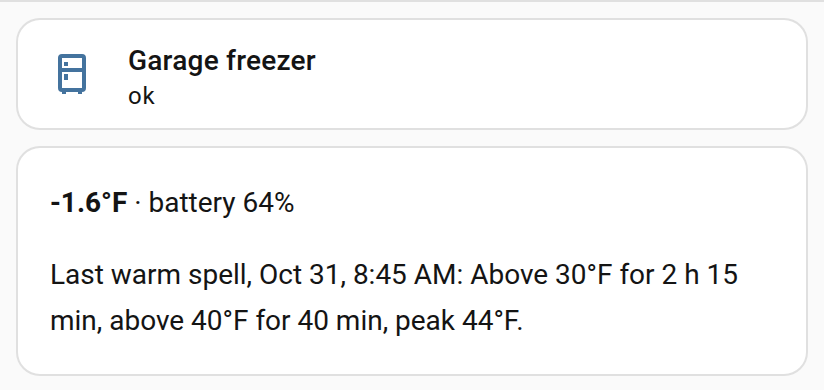
- A “back to normal” message when it recovers. The kit version adds a summary: “Basement freezer recovered. Above 30°F for 2 h 15 min, above 40°F for 40 min, peak 44°F.”
- No false alarms from a quick spike, like an open lid or the freezer’s own defrost cycle.
- An alert design that keeps working through a Home Assistant restart or reload. That turned out to be the hard part (see “Where I broke it”).
What you need
| Thing | What I used | Rough cost |
|---|---|---|
| Home Assistant | My existing install (2026.9) | $0 |
| A temperature sensor per freezer | Sonoff SNZB-02P, a small Zigbee sensor with a coin-cell battery | $10 to $20 |
| A way for the sensor to talk to Home Assistant | My existing Zigbee setup | $0 if you have one |
| The Home Assistant app on your phone | For the notifications | $0 |
Any temperature sensor that shows up in Home Assistant works. Zigbee is just what I already had. If Home Assistant is new to you, get it running and get one sensor showing a temperature first, then come back.
Steps
This is the free version: one alert, its reminders and a “back to normal” message, for one freezer.
1. Put the sensor in the freezer
Pair it with Home Assistant first, while it’s warm and close to your hub. Then put it inside, away from the lid or door seal, somewhere a basket won’t crush it. The Zigbee signal got through my freezer’s walls fine, but check that it keeps reporting for a day before you trust it.
Note its entity ID: open the sensor under Settings > Devices & services > Entities. It looks something like sensor.basement_freezer_temperature.
2. Find your phone’s notify action
In Developer tools > Actions, type notify.mobile_app. Pick your phone, for example notify.mobile_app_pixel_8, and run it once with a test message to check it arrives.
3. Turn on packages
A package is one file that can hold sensors, helpers and automations together, which makes this a single paste. In /config/configuration.yaml, add this (or, if you already have a homeassistant: line, just add the packages: line under it):
homeassistant: packages: !include_dir_named packagesThen create a packages folder in /config. The File editor add-on is the easiest way to do both.
4. Paste the alert
Save this as /config/packages/freezer_basic.yaml, then use find-and-replace to put in your sensor and your phone. If your sensor reports in °C, also change every 30 to -1 and °F to °C:
# Basic freezer alert (free version). Save as /config/packages/freezer_basic.yaml# Use find-and-replace: change every sensor.your_freezer_temperature to your# freezer's temperature sensor, and every notify.mobile_app_your_phone to your phone.# Sensor in °C? Also change every 30 to -1, and °F to °C in the messages.
template:  # A copy of your sensor's reading, taken once a minute. Many sensors only  # report when the value changes, or every 15+ minutes; sampling every minute  # means "15 minutes" below really is 15 minutes of readings.  - triggers:      - trigger: time_pattern        minutes: "/1"      - trigger: state        entity_id: sensor.your_freezer_temperature    sensor:      - name: Freezer temperature sampled        unique_id: freezer_temperature_sampled        unit_of_measurement: "°F"        availability: "{{ is_number(states('sensor.your_freezer_temperature')) }}"        state: "{{ states('sensor.your_freezer_temperature') }}"        attributes:          sampled: "{{ now().isoformat() }}"
sensor:  # The coldest one-minute sample in the last 15 minutes. If even that is above  # 30°F, the freezer has been warm for 15 minutes. This lives in recorded  # history, so a restart or reload can't lose track of it.  - platform: statistics    name: Freezer minimum 15 min    unique_id: freezer_minimum_15_min    entity_id: sensor.freezer_temperature_sampled    state_characteristic: value_min    max_age:      minutes: 15    sampling_size: 500    keep_last_sample: true
input_boolean:  freezer_alerting:    name: Freezer alerting
automation:  - id: freezer_basic_alert    alias: Freezer too warm (basic)    mode: queued    triggers:      - trigger: numeric_state        entity_id: sensor.freezer_minimum_15_min        above: 30      - trigger: numeric_state        entity_id: sensor.your_freezer_temperature        below: 30      - trigger: time_pattern        minutes: "/15"      - trigger: homeassistant        event: start    actions:      - choose:          # Warm for 15 minutes: first alert, then a reminder every 15 minutes          - conditions:              - condition: numeric_state                entity_id: sensor.freezer_minimum_15_min                above: 30            sequence:              - action: notify.mobile_app_your_phone                data:                  title: >-                    {{ 'Freezer still too warm' if is_state('input_boolean.freezer_alerting', 'on')                       else 'Freezer too warm' }}                  message: >-                    Above 30°F for at least 15 minutes (now {{ states('sensor.your_freezer_temperature') }}°F).              - action: input_boolean.turn_on                target:                  entity_id: input_boolean.freezer_alerting          # Cold again after an alert          - conditions:              - condition: state                entity_id: input_boolean.freezer_alerting                state: "on"              - condition: numeric_state                entity_id: sensor.your_freezer_temperature                below: 30            sequence:              - action: notify.mobile_app_your_phone                data:                  title: Freezer back to normal                  message: >-                    Back under 30°F (now {{ states('sensor.your_freezer_temperature') }}°F).              - action: input_boolean.turn_off                target:                  entity_id: input_boolean.freezer_alerting
How it works: the first part copies your sensor’s reading once a minute, because many sensors only report every 15 minutes or when the value changes. The statistics sensor then keeps track of the coldest of those one-minute samples in the last 15 minutes. If even the coldest one is above 30°F, the freezer has been warm the whole time, so it’s time to alert. The toggle (input_boolean) remembers that an alert went out, so it knows to send “back to normal” later.
5. Check and restart
Developer tools > YAML > Check configuration. If it complains, it’s almost always indentation, so compare with the block above. Then Restart.
6. Make sure it’s watching
In Developer tools > States, find sensor.freezer_minimum_15_min. It should show a number close to your freezer’s temperature. If it says unknown, the sensor name in the file doesn’t match yours.
Where I broke it
I built my first version of this with Claude, the AI assistant I use for most of my homelab work, back in September. Claude wrote and tested the automations, and I confirmed the alerts actually reached my phone. It worked, but writing this article turned up problems I hadn’t thought about.
The reminder that could stop on a reload
The obvious way to write “remind me every 15 minutes while it’s warm” is a loop inside the automation: send, wait 15 minutes, check, repeat. I’d already seen that pattern fail on another automation of mine: when Home Assistant reloads an automation (which happens when you save it in the editor, or reload automations), a running loop in it is silently killed. For a freezer alarm, that’s the worst possible failure. You’d get one alert, then nothing, and assume it was fine.
So the reminders don’t loop. A timer checks every 15 minutes, which gives a fresh, independent check each time, and a reload can’t cancel it.
…and the first alert that could still vanish
Here’s the part I didn’t know until this month. While planning this article and the kit, Claude reviewed my original automation and found a gap. The first alert used Home Assistant’s standard “above 30 for 15 minutes” trigger. If Home Assistant restarts or reloads during those 15 minutes, that wait is quietly cancelled. When it comes back, the freezer is already above 30°F, so it never “crosses” 30 again, and the alert never fires. The reminders never start either, because they only run after the first alert.
That’s an edge case, but it’s exactly the edge case you’d hit if, say, a power blip rebooted things just as the freezer quit. The free version above avoids it by asking a different question: not “has it been warm for 15 minutes since I started watching?” but “was the coldest reading in the last 15 minutes still warm?” The answer comes from recorded history, so a restart doesn’t reset anything. The kit goes further and keeps a complete record of each warm spell that survives restarts.
Testing the all-clear was harder than it looked
To test the “back to normal” message without warming a real freezer, Claude faked a reading. The first attempt set the sensor from one cold value to another cold value, and nothing happened. Of course: the trigger fires when the temperature crosses below 30, and going from -2 to 0 isn’t a crossing. The fake reading has to go above 30 first, then back below. The kit sidesteps this with a pretend freezer and a test button.
My freezer warms itself up
When Claude pulled ten days of readings for this article, the basement freezer had climbed to about 25°F twice, for half an hour each time, in the early morning, then dropped straight back. Claude reads that as the freezer’s automatic defrost cycle, which many freezers run on their own; I haven’t confirmed it. Neither event got anywhere near an alert, and that’s the point of the threshold and the 15-minute wait. A stricter alert would have woken me up twice for nothing.
It’s also a reason to keep the history: if this old freezer starts defrosting more often or for longer, that might be an early sign of trouble.
Batteries hate the cold
The sensor runs on a coin cell, and coin cells really don’t like living at 0°F. I added a second automation that alerts when a sensor’s battery drops to 20%, with a daily reminder after that. Mine are at 36% and 51% right now, so it hasn’t fired yet. A dead battery is the most likely way this whole setup fails silently: no readings means no alerts. The kit also alerts when a sensor stops reporting for two hours, for exactly that reason.
What it can’t catch
All of this runs on Home Assistant, my network and my phone. If Home Assistant itself is down, nothing alerts. That needs a separate “is Home Assistant alive” check, which is its own project.
A note on food safety
This tells you how long the freezer was warm. It doesn’t tell you what’s safe to eat. For that, check the official guidance: search foodsafety.gov for “Food Safety During Power Outages”, and the USDA’s fsis.usda.gov for “Freezing and Food Safety”. Their rule of thumb is that food that still has ice crystals, or is at 40°F or below, can be refrozen. That’s why the kit tracks time above 40°F separately.
Want the full version?
The free build gives you an alert for one freezer. The kit is what now runs both of my freezers:
- Any number of freezers, each set up by copying one block.
- A warm-spell summary in the “back to normal” message: time above 30°F, time above 40°F, the peak, and any time the sensor stopped reporting.
- Survives restarts and reloads at every step, including the first 15 minutes.
- Sensor quiet and battery low alerts.
- A safe test button that runs the whole chain on a pretend freezer in about 10 minutes, without touching the real ones.
- A dashboard card for each freezer, °F or °C, and optional alerts that break through Do Not Disturb.
- A printable setup guide and checklist.
Related
Want it ready to go? Freezer Alerts Kit
Phone alerts when a freezer warms up, with a summary of how long and how warm, plus a safe test button.
$9
Coming soon